


MAC address spoofing is a technique for temporarily changing your Media Access Control (MAC) address on a network device. A MAC Address is a unique and hardcoded address programmed into network devices which cannot be changed permanently. The MAC address is in the 2nd OSI layer and should be seen as the physical address of your interface. Macchanger is a tool that is included with any version of Kali Linux including the 2016 rolling edition and can change the MAC address to any desired address until the next reboot. In this tutorial we will be spoofing the MAC address of our wireless adapter with a random MAC address generated by Macchanger on Kali Linux.
MAC Address Spoofing
First we need to take down the network adapter in order to change the MAC address. This can be done using the following command:
Now use the following command to change your MAC address to a new random MAC Address:
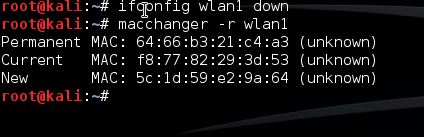
As shown on the screenshot, Macchanger will show you the permanent, current and changed MAC address. The permanent MAC Address will be restored to your network adapter after a reboot or you can reset your network adapters MAC address manually. Use the following command to restore the permanent MAC address to your network adapter manually:
ERROR: Can’t change MAC: interface up or not permission: Cannot assign requested address
Use the following command to bring up your network adapter with the new MAC address:
MAC Address Spoofing
First we need to take down the network adapter in order to change the MAC address. This can be done using the following command:
The ifconfig tool will be replaced by iproute2. Use the following command to take down wlan1 with iproute2:ifconfig wlan1 down
Click to expand...
Replace wlan1 with your own network interface.ip link set wlan1 down
Click to expand...
Now use the following command to change your MAC address to a new random MAC Address:
macchanger -r wlan1
Click to expand...
As shown on the screenshot, Macchanger will show you the permanent, current and changed MAC address. The permanent MAC Address will be restored to your network adapter after a reboot or you can reset your network adapters MAC address manually. Use the following command to restore the permanent MAC address to your network adapter manually:
You can also spoof a particular MAC address using the following command:macchanger –permanent wlan1
Click to expand...
If you receive the following error you need to take down the network interface first before changing the MAC Address (Command: ifconfig wlan1 down):macchanger -m [Spoofing MAC Address] wlan1
macchanger -m XX:XX:XX:XX:XX:XX wlan1
Click to expand...
ERROR: Can’t change MAC: interface up or not permission: Cannot assign requested address
Use the following command to bring up your network adapter with the new MAC address:
Or use the following iproute2 command to bring the wlan1 device back up:ifconfig wlan1 up
Click to expand...
Use the following command to show the current MAC address:ip link set wlan1 up
Click to expand...
macchanger –show wlan1
Click to expand...